(SYS.08) — PERSONAL PRODUCT — WINDOWS PRESENTATION & SCREEN SHARING
SwitchCast
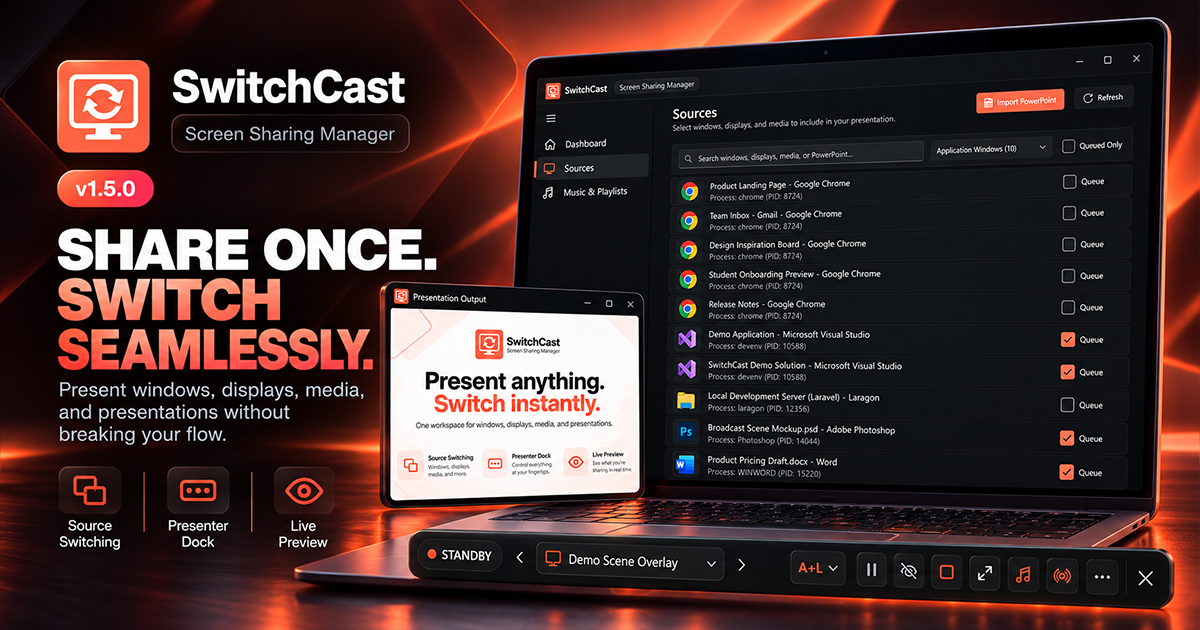
Seamless Windows screen sharing and presentation control without interrupting the audience-facing output.
(01) — System Overview
PROJECT
CONTEXT.
A native Windows desktop application built with C#, .NET 8, WinUI 3, and Direct3D 11. Presenters queue and switch between application windows, displays, and media through one dedicated output window without interrupting the audience stream.
The Operational Bottleneck / Problem
Presenters frequently need to switch between application windows, code editors, monitors, images, and video clips during meetings and webinars. Conventional workflows require stopping and restarting screen shares—causing disruption, awkward delays, and accidental exposure of personal desktop notifications or confidential windows.
Engineering Solution
Engineered a native Windows presentation utility with a dedicated, stable output window that remains the single shared target in meeting software, while SwitchCast manages and seamlessly switches between queued application windows, monitors, and media files through GPU-accelerated composition.
(02) — Architecture & Pipeline
SYSTEM
ARCHITECTURE.
WinUI 3 Fluent shell coordinating an MVVM presentation tier, delegating to a centralized CaptureEngineCoordinator that orchestrates Windows.Graphics.Capture Direct3D 11 frame pools and Windows.Media.Playback pipelines onto a dedicated DXGI swapchain output window.
Data & Execution Pipeline
(03) — Technical Focus
ENGINEERING
HIGHLIGHTS.
Continuous Dedicated Output Window Architecture
Engineered a persistent 16:9 audience-facing presentation canvas shared once in conferencing software, eliminating stream interruptions, dead air, and desktop privacy exposure when transitioning across multiple applications.
Direct3D 11 GPU-Backed Frame Composition
Implemented hardware-accelerated desktop capture via Windows.Graphics.Capture and DXGI swapchains, streaming window and display visual buffers directly in GPU memory at 60 FPS with minimal CPU overhead.
Adaptive Rendering with Resilient WARP Fallback
Architected adaptive graphics initialization supporting Direct3D 11 hardware execution, automatic failover to the WARP software rasterizer for virtual/RDP environments, and automated device-loss recovery.
Serialized Concurrency & Presenter Workflow Engine
Built a latest-request-wins switching coordinator with clean session teardown alongside an ultra-slim floating companion dock, system-wide hotkeys, three switching modes, freeze-frame, and blackout privacy curtain.
(04) — Implemented Capabilities
CORE
FEATURES.
Dedicated 16:9 audience-facing presentation window
Live application window and physical monitor capture
Direct video and high-resolution image presentation queue
Local video audio playback with atomic timeline scrubbing and volume controls
Three switching modes: Live Only (L), Active + Live (A+L), and Active Only (A)
Floating presenter companion dock with transport and timecode controls
System-wide global keyboard shortcuts for seamless transitions
Instant Pause / Freeze-Frame presentation control
Blackout privacy curtain for immediate screen blanking
Native borderless fullscreen and windowed presentation output
Automatic 32-bit Windows icon extraction for queued sources
100% offline, local-first execution with zero cloud telemetry
(05) — Technology Stack
STACK
ARCHITECTURE.
Desktop Core & MVVM
Capture & Rendering Pipeline
Media & Presentation Output
OS Interop & Distribution
(06) — Problem Solving
TECHNICAL
CHALLENGES.
Preventing Capture Session Race Conditions During Rapid Switching
Implemented a serialized latest-request-wins transition coordinator utilizing cancellation tokens and asynchronous frame pool disposal, ensuring rapid keyboard or dock switching never leaves orphaned Direct3D capture sessions or leaked graphics handles.
Decoupling Presenter Interaction From Audience Output
Designed three distinct switching workflows (Live Only, Active + Live, Active Only) and created an ultra-slim floating presenter dock with non-client caption dragging, allowing presenters to manage feeds and interact with local applications independently from the audience-facing stream.
(07) — Reliability & Governance
SECURITY & TESTING.
Privacy & Security Model
Engineered as a local-first Windows application with zero telemetry, zero analytics, and zero cloud backend requirements. Screen buffers and media playback stay strictly within local machine memory, and no meeting traffic or packet interception is performed.
Quality Assurance & Tests
Validated against published v1.5.0 stable release packages across Windows 10 (1809–22H2) and Windows 11 (21H2–24H2) x64 configurations, verifying Direct3D 11 device creation, WARP fallback paths, multi-monitor topologies, and standalone unpackaged installer distribution.